
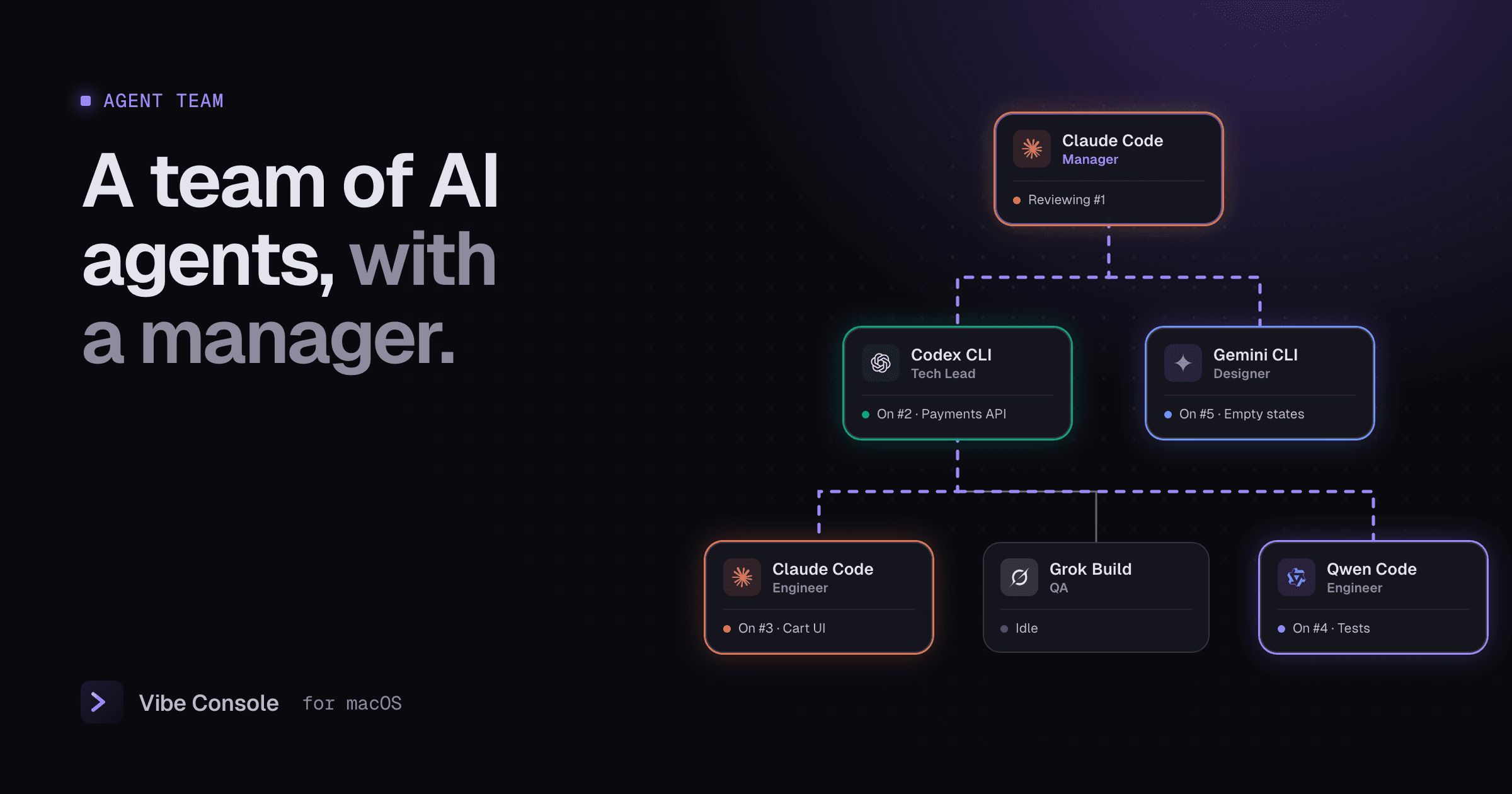
Running several agents in parallel works, but you become the project manager: you split the work, write a prompt for each terminal, check who is done and review everything yourself. Vibe Console's Agent Team hands that job to an agent.
You talk to one manager. It plans, delegates and reviews. The rest of the team works in the background, and you watch the whole thing on a live org chart.
What the Agent Team is
A team is a per-project org chart of agent CLIs. Each card is one member with a role, an agent and a model:
- Manager: the only member you talk to. It turns your request into a brief, splits it into tasks and hands them out.
- Tech Lead: takes a large task, splits it for the people under it and reviews their work.
- Engineer: implements the changes its tasks ask for.
- Designer: builds the interface and its copy, consistent with your existing design.
- QA: runs the tests, tries the changed behaviour, writes missing tests and reports what fails.
- Security, DevOps, Researcher: review for security problems, handle build and CI, or investigate questions and report back.
Every seat can run any of the eight agents Vibe Console supports: Claude Code, Codex, Gemini CLI, Grok Build, GitHub Copilot CLI, Cursor CLI, Qwen Code and Kimi Code. So Claude Code can manage while Codex writes the backend, Gemini CLI handles the UI and Grok Build writes tests. Each member picks its own model.
How a request moves through the team
- You ask the manager. A plain question gets a plain answer. A change request gets a brief first.
- The manager writes a brief. It looks at your project and rewrites the request with the goal, the files involved, what done looks like and what is out of scope. You choose: go with the brief, write your own version, or send your original request as it is.
- The work is split into tasks. The manager creates tasks on a shared board and assigns each to the member whose role fits. A tech lead can split its task further for its engineers and QA.
- Members work in the background. Each member has its own terminal and talks only through the board: it submits its task, comments on others' tasks or asks a question. Nobody talks to you except the manager.
- Whoever handed out the work reviews it. No one approves their own task. A reviewer can send it back with changes requested.
- You review the result. When the board is done, the manager tells you what the team did and anything left open.
On the chart, busy agents glow with a light running round their card, and the lines between cards animate as tasks travel down to whoever does them and back up for review. The task list beside the chart shows every task as Assigned, In review or Done.
Your project stays safe
The team never works in your checkout directly:
- Its own worktree. Start Team creates a git worktree on a
vibe-team/…branch, so the team's edits never collide with yours. - Your local files come along. Git-ignored files such as
.env, docs and local config are linked into the worktree, so the agents can run the app. - Review Changes shows the team's diff across the whole repository. Apply to Project writes it to your project uncommitted, so you still decide what to commit.
- Apply approved work automatically (on by default) brings approved work into your project, uncommitted, while the team keeps going. A conflict is shown and left for Review Changes.
- Stop Team closes the terminals but keeps the worktree and the tasks for next time. Discard deletes the worktree, the branch and the tasks.
Presets to start from
You do not have to build the chart by hand. Pick a preset and edit it:
| Preset | Who is on it |
|---|---|
| Small team | Manager, engineer, QA |
| Engineering team | Manager, tech lead, two engineers, QA, designer |
| Coding | Manager, two engineers, QA |
| Bug Review | Manager, two QA, engineer |
| Security Review | Manager, two security reviewers, engineer |
| Research | Manager, two researchers |
| Design | Manager, designer, engineer, QA |
| DevOps | Manager, DevOps, engineer, QA |
Then click a card to change its role, agent, model or who it reports to.
Why mix agents in one team
Different agents are good at different things, and a second agent is a better reviewer than the one that wrote the code. A team makes that the default instead of a habit you have to keep up:
- A reviewer that did not write the code catches more of its mistakes. See Codex vs Claude Code for where each one shines.
- Spreading the work across providers spreads it across your usage limits too.
- Each member gets the model that fits its role: a large model for the manager and tech lead, a faster one for tests.
Start a team in Vibe Console
- Open a project and press ⌘⇧E, or the team button in the toolbar.
- Pick a preset and adjust the chart.
- Press Start Team and write your request to the manager in its terminal.
- Watch the chart, then use Review Changes when the work is done.
You bring the agent CLIs and your own accounts. Vibe Console runs them, keeps the board and shows you what everyone is doing.
FAQ
Do I talk to every agent?
No. You talk only to the manager. The other members work in the background and coordinate through the task board. You can still open any member's terminal from its card to watch it work.
Which agents can be on a team?
Any of the eight Vibe Console supports: Claude Code, Codex, Gemini CLI, Grok Build, GitHub Copilot CLI, Cursor CLI, Qwen Code and Kimi Code. Each member has its own agent and model.
Will the team overwrite my uncommitted work?
No. The team works in its own git worktree on a separate branch. Its changes reach your project only when you apply them, or when approved work is applied automatically, and they arrive uncommitted.
Does it cost extra?
The Agent Team is part of Vibe Console's one-time license. The agents run on your own accounts and subscriptions, so each member uses its provider's limits.