
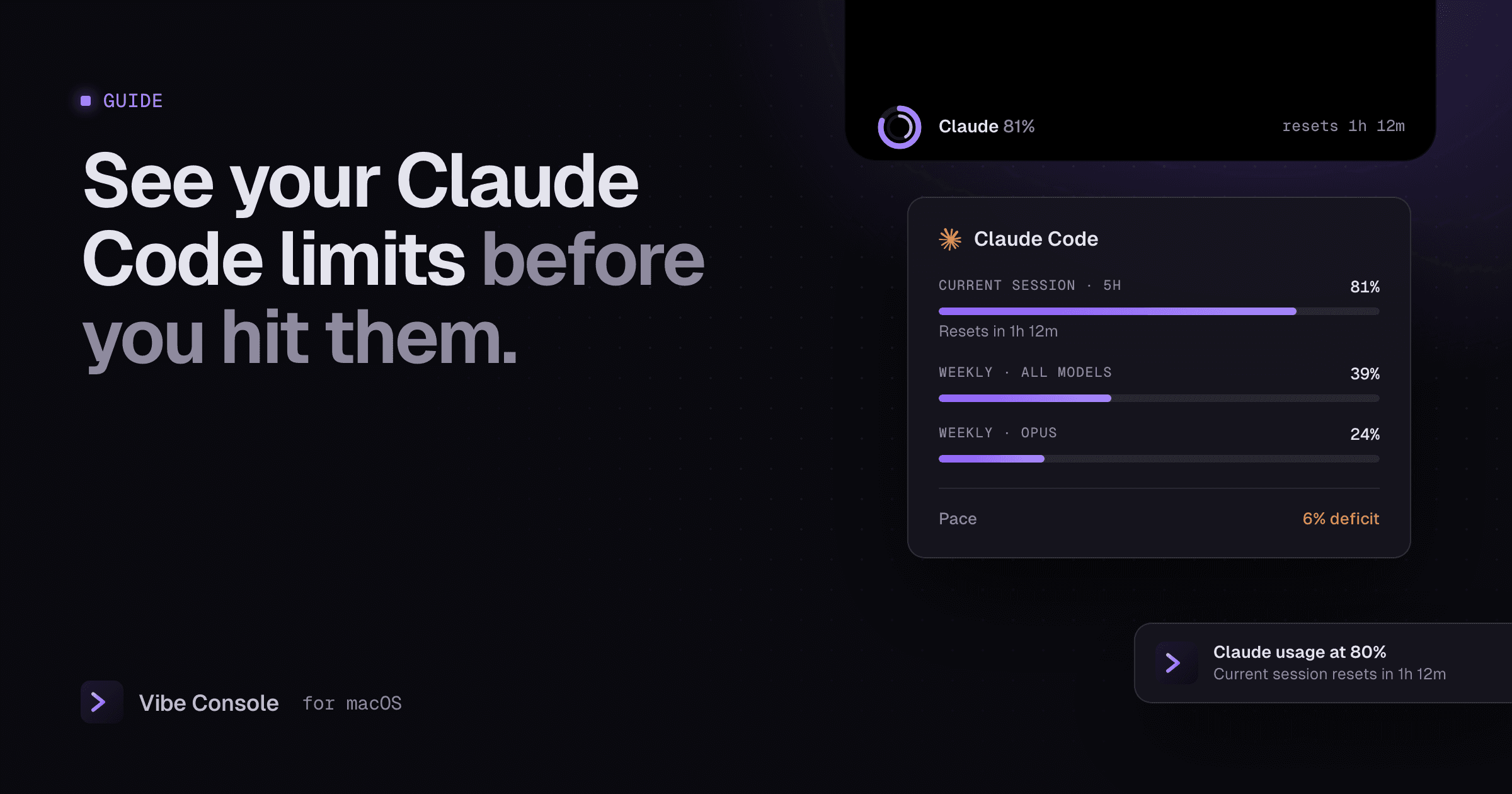
Few things break a coding session like "usage limit reached" halfway through a refactor. Claude Code's limits are predictable once you can see them. This guide explains the windows, the built-in ways to check them and how to keep them visible on a Mac.
How Claude Code usage limits work
On Claude subscription plans, Claude Code usage is metered in windows rather than by the token:
- Current session (5-hour window). Usage counts against a rolling window of about five hours that starts with your first message. When it resets, you have a full window again.
- Weekly limit. A separate limit across all models over seven days.
- Model-specific weekly limits. Some plans also have weekly limits for particular models, such as Opus.
Anthropic does not publish exact numbers, and they depend on your plan: Max 5x and Max 20x give five and twenty times Pro's per-session allowance. Usage is shared with Claude chat on the same account. You can also see it on the web in claude.ai under Settings → Usage. The practical point is that there are two clocks: the 5-hour one decides your afternoon, the weekly one decides your week.
If you use Claude Code with an API key instead of a subscription, you pay per token and these windows do not apply; your spend is tracked in the Anthropic Console.
Checking your usage in Claude Code
Inside Claude Code, run:
/usage
It shows how much of your current session and weekly limits you have used and when they reset. It is accurate, but you have to remember to ask, and it only shows while you are looking at that terminal.
Keep your limits visible on a Mac
Vibe Console shows your Claude Code and Codex usage all the time, without typing a command:
- Rings in the notch and the toolbar. One ring per provider shows how much of the current window you have used. An optional thinner second arc shows the weekly limit (Settings: Off, Inside or Outside).
- Hover for details. The card lists the current session, the weekly limit for all models and model-specific limits such as Opus and Sonnet, each with its reset time.
- Pace. The card compares how much of your quota you have used with how much of the window has passed. "6% deficit" means you are using it faster than an even pace and will run out early; "10% reserved" means you have room to spare.
- Alerts. A macOS notification when a limit crosses 80% and again at 100%, once per window. When a limit resets, a notch card and a sound tell you that you are good to go. Mute any provider you do not care about.
- Menu bar. Optionally show chosen providers' limits in the menu bar instead of the icon.
Usage refreshes every minute while you work, and you can click a ring to refresh it immediately.
Where the numbers come from
To show your Claude usage, Vibe Console reads Claude Code's sign-in on your Mac and asks Anthropic for your usage, the same data /usage shows. macOS asks you once whether to allow it. The sign-in stays on your Mac and is only sent to Anthropic. You choose which providers are read in Settings → Accounts. Details are in our privacy policy.
Codex usage limits
Codex plans also meter usage in a primary 5-hour window and a weekly window. Vibe Console shows them the same way, next to Claude, so you can move work to whichever agent has room.
How to make your limits last
- Watch pace, not just percent. 60% used with an hour left in the window is fine; 60% used ten minutes in is not.
- Use a lighter model for simple work. Save the largest model for planning and hard problems.
- Keep context lean. Clear or compact long conversations, and point the agent at the files that matter instead of the whole repository. Token-saving skills help; see installing agent skills.
- Plan parallel work around the window. Several agents spend a window several times faster. See running agents in parallel.
- Split work across providers. When Claude is close to its limit and Codex is not, hand review or smaller tasks to Codex.
FAQ
How long is the Claude Code usage limit window?
The session window is about five hours from your first message, and there is a separate weekly limit. Check /usage or the ring's hover card for your exact reset times.
What happens when I hit the limit?
Claude Code tells you that you have hit your session or weekly limit and when it resets. Switching models does not help for those limits, though it does for a model-specific one such as Opus. To keep working, wait for the reset, upgrade, or run /usage-credits to continue with usage credits.
Does Vibe Console change my limits?
No. It only reads and shows them. Your plan and your agent decide the limits.
Try it free for 14 days: download Vibe Console.